
How recommendations work, and how to read your insights
On this page
CrowOn Rank is what takes your posts to people who don't follow you yet. Here's how posts are picked, and how to read the numbers afterwards.
How a post gets recommended
- First, a few people. A new post is first recommended to a small group. Your follower count doesn't matter.
- Reactions are read. Did people watch to the end, comment, share, follow or save? Skips count too. Comments weigh the most.
- Then more people. If people react well, it goes to a bigger group next. This repeats over several rounds.
How recommendations work (Help Center)
Open your insights
Go to Settings›Your activity›Insights. Only you see them. Viewers are counted, never named.
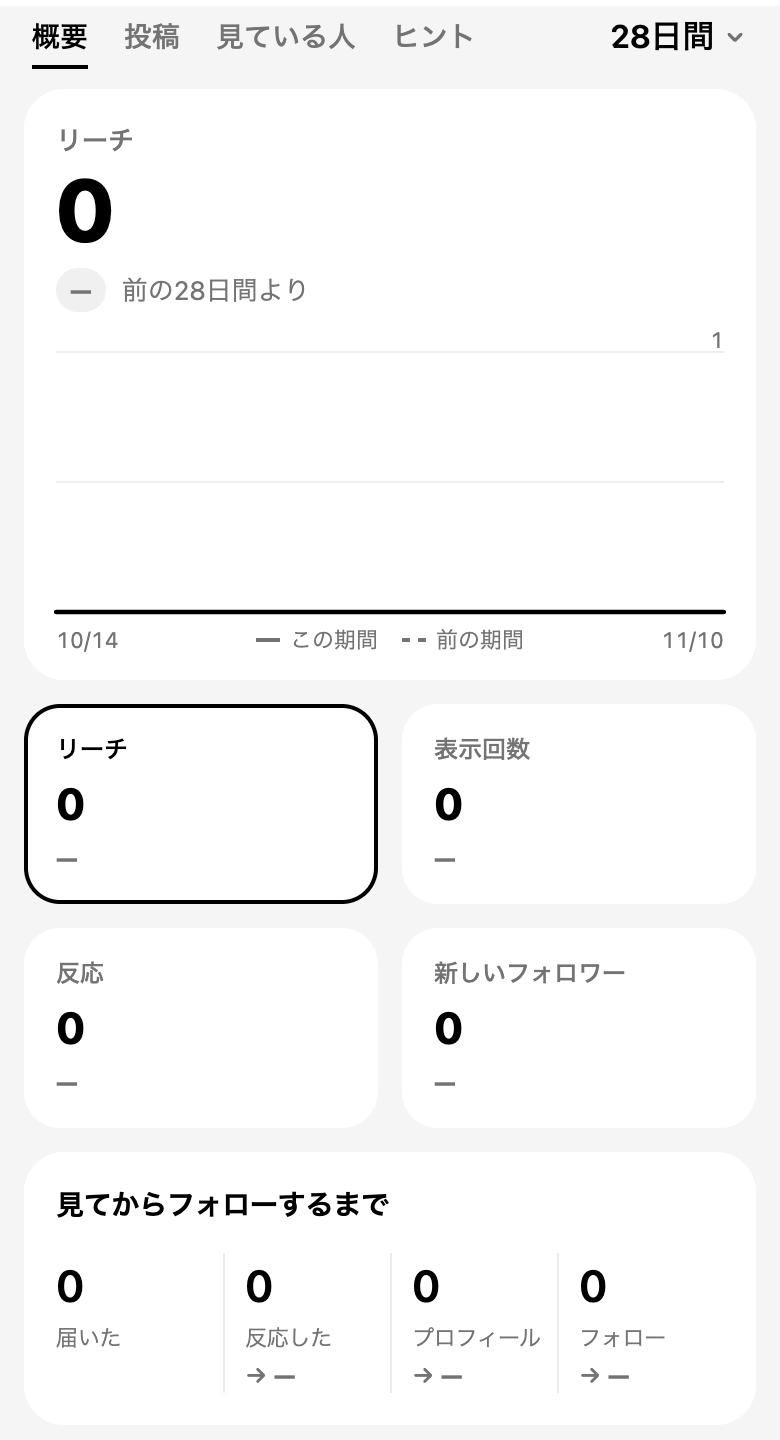
Period
Choose 7 days, 28 days, 90 days or 1 year at the top right. Under each number is the change from the previous period of the same length.
Four numbers
- Reach
- How many people saw your posts.
- Views
- How many times your posts were shown. One person seeing it twice counts twice.
- Reactions
- Likes, comments, shares and saves together.
- New followers
- Followers gained in the period.
From seeing to following
Four steps, reached → reacted → profile → follow, show where people drop off. Few reactions for your reach? Look at the first seconds. Many profile visits but few follows? Look at your profile.
Real time
See the last 48 hours hour by hour, and views in the last 60 minutes. Useful right after you post.
There are also Posts, Audience and Tips tabs. Insights help
Reaching further
- See translation
- Posts in a language other than the viewer's show See translation. It runs on CrowOn's own server.
- Hashtags
- See tags people are posting about now, with a page for each tag.
- Add Yours
- Add it to a NOW and people who see it can carry the prompt on.
- Broadcast channels
- Only admins post; members read and react.
Screens are from CrowOn on the web. The iPhone app has the same settings under the same names.